Kyrre Bakke · January 2026 · Last updated January 2026
Which Applications Should You Actually Keep? A Practical Guide to TIME Analysis
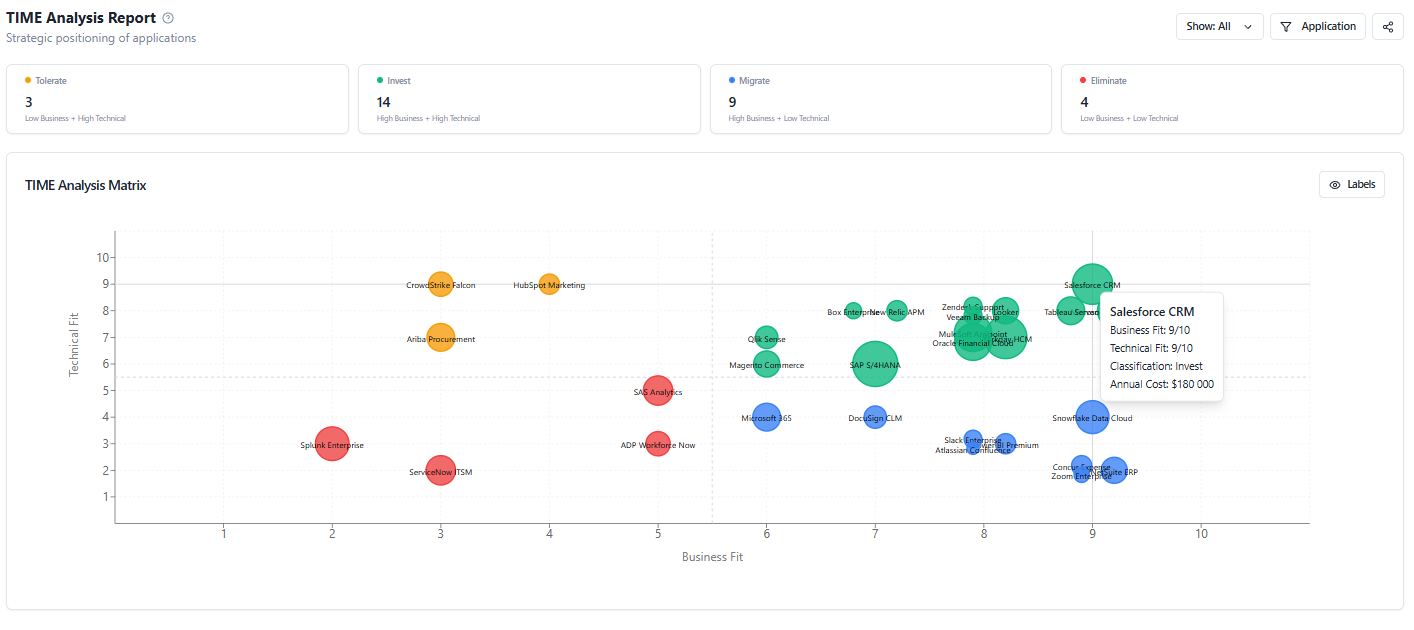
TIME analysis classifies each application as Tolerate, Invest, Migrate, or Eliminate based on two scores: Business Fit and Technical Fit (each 1 to 10). The framework turns gut feel about applications into a shared, structured decision.
Every IT organization has applications they're not sure what to do with. Some are clearly valuable. Others are clearly obsolete. But most live somewhere in between, and that's where decisions get messy. TIME analysis is a simple framework that brings structure to these conversations.
If you've worked in IT for a while, you know how these decisions typically go. Someone proposes retiring a system. Someone else says it's critical. Nobody has the data to settle it. The conversation stalls, and another year passes.
Or worse, decisions are made based on gut feeling, the loudest voice in the room, or whoever happens to own the budget that quarter. Applications limp along without investment, or get replaced before their time.
TIME analysis exists to bring objectivity to these situations.
What TIME actually means
TIME is an acronym for four strategic classifications: Tolerate, Invest, Migrate, and Eliminate. Each represents a different posture toward an application based on its current state.
- Tolerate: Good technology but limited business value. Keep it running efficiently without major expansion.
- Invest: Strong business value with solid technology. These are your strategic applications worth expanding.
- Migrate: Good business value but weak technology. Plan to move to a better platform or modernize.
- Eliminate: Poor fit on both dimensions. Plan to retire, replace, or significantly rework.
The beauty of TIME is that it forces you to think along two dimensions at once. Not just "is this app good or bad?" but "is it good for the business, and is it good technically?"
The two dimensions: Business Fit and Technical Fit
The TIME classification emerges from two scores: Business Fit and Technical Fit. Each is rated on a simple scale (typically 1 to 10).
Business Fit asks: how well does this application serve the business today? Is it aligned with current strategy? Is it used? Does it enable key capabilities?
Technical Fit asks: how healthy is the platform? Is it maintainable? Secure? Scalable? Is it built on modern, supported technology?
When you plot applications on a 2x2 grid (Business Fit on one axis, Technical Fit on the other) the four quadrants map directly to the TIME categories.
Why relative scoring matters more than perfection
Here's something important: your scores don't need to be perfect. What matters is that they're consistent.
The goal isn't to scientifically prove that Application X has a Business Fit of exactly 7.3. The goal is to have a shared language for comparing applications relative to each other.
If your ERP scores 8 for Business Fit and your legacy reporting tool scores 4, you now have a basis for conversation. The exact numbers matter less than the relative positioning.
In practice, a small group (IT, business stakeholders, maybe architecture) can align on scores quickly. You're not doing a six-month study. You're capturing the informed judgment you already have and making it visible.
What each quadrant tells you
Once applications are classified, the strategic implications become clear.
Invest
These are your winners. High business value, strong technology. Keep modernizing, keep extending. These are the platforms your future runs on.
Tolerate
Good technology but limited business value. Keep these running efficiently without major expansion. They work fine technically, so just don't over-invest.
Migrate
Good business value but weak technology. These support important capabilities, but the platform is aging or problematic. Plan to move to a better platform or modernize.
Eliminate
Poor fit on both dimensions. These are retirement candidates. Plan to retire, replace, or significantly rework. Sometimes dependencies delay the exit, but the direction is clear.
How ArchiBuddy makes TIME analysis practical
TIME analysis works on a whiteboard. But keeping it current across dozens or hundreds of applications requires a bit more structure.
ArchiBuddy automates the classification. You enter Business Fit and Technical Fit scores for each application, and the TIME category is calculated automatically. A visual report shows the full portfolio mapped on a grid, making it easy to spot patterns, outliers, and priorities.
You can filter by business capability to see which areas of the business are running on healthy apps and which are living on technical debt. You can combine TIME analysis with cost data to see where you're spending money on "Eliminate" candidates.
And because the scores live in a shared system, not someone's private spreadsheet, they stay updated. When business fit changes because strategy shifted, you update the score. The TIME classification adjusts automatically.
When to use TIME analysis
TIME is useful in several situations:
- Annual portfolio reviews: Get a clear picture of the overall health of your application estate.
- Budget discussions: Use TIME classifications to justify investment or retirement decisions.
- Merger and acquisition: Quickly classify the incoming portfolio to identify synergies and redundancies.
- Cloud migration planning: Prioritize what to move, modernize, or retire before moving to cloud.
In all these cases, TIME provides a shared vocabulary for making decisions that would otherwise devolve into opinion battles.
Getting started
You don't need perfect data to begin. Start with your most important applications, maybe your top 20 or 30. Get business and IT in a room, agree on rough scores, and map them.
You'll learn more from the conversation than from the scores themselves. And once the first round is done, you've established a baseline you can iterate on.
If you're looking for a lightweight EA tool to get this done, ArchiBuddy provides everything you need: inventory management, scoring, automated classification, and clear visualizations. Built by practitioners who've done this work for years and wanted something practical.
Run TIME analysis on your own portfolio
Score business fit and technical fit, and ArchiBuddy classifies each application as Tolerate, Invest, Migrate or Eliminate.
14 days, no credit card required
Explore the live demo